In UCPath, HR and payroll concepts are grouped into categories, called subject areas, which gather related data together based on usage and business process. The subject areas in UCPath are:
| Subject Area | Overview | Central-Level Access Data Model | Dept-Level Access Data Model | Last Updated Central-Level | Last updated Depart-Level |
|---|---|---|---|---|---|
| Absence Management Data about any absence from an employee’s job. | view | view | view | 3/1/2023 | 3/1/2023 |
| Benefits Data about employees and their dependent’s benefits elections as well as data about plan types and deductions. | view | view | view | 9/27/2020 | 9/27/2020 |
| Budget Ledger Data about employee budget including data about job, position and funding. | - | view | view | 2/23/2019 | 2/23/2019 |
| Identity Management Data that contains UC identifiers that enable access to external systems throughout UC and matches to UCLA’s UID system. | - | view | view | 10/22/2018 | 10/22/2018 |
| Job Data about an employee’s position(s) with the university as well as attributes that describe the job itself. | view | view | view | 9/20/2023 | 9/20/2023 |
| Job Profile Management Data to track Person’s honors and awards, degrees, licenses and certifications. | - | view | view | 2/23/2019 | 2/23/2019 |
| Labor Ledger Data about payroll transactions at an employee level, including associated accounting unit, earnings and deductions. | - | view | view | 6/20/2020 | 6/20/2020 |
| Lookup Subject Area Lookup Tables | - | view | view | 6/20/2020 | 6/20/2020 |
| Payroll and Commitment Accounting Data about the pay process from a point prior to funding to actuals. | view | view | view | 6/20/2020 | 6/20/2020 |
| Person Data that are unique to a person such as employee ID, name, citizenship attributes, etc. | view | view | view | 2/23/2019 | 2/23/2019 |
ODS Data Dictionary
For more information about the tables and columns included in ODS, please refer to the ODS Data Dictionary.
Data Governance Catalog
To obtain access to the online Information Governance Catalog (IGC), which serves as our interactive data dictionary, please go to the IGC web site and request access. After access is granted, you will use the same link to access the catalog.
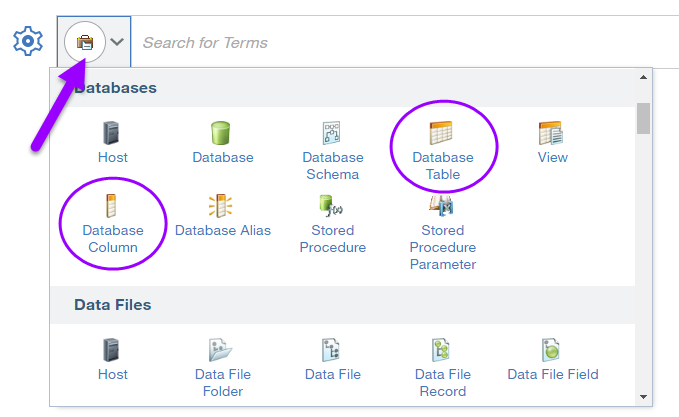
To search the IGC for a particular ODS table or column name, first choose the type of item you're searching for by clicking the search drop-down, as shown below, then type in the name of the item in the search box: